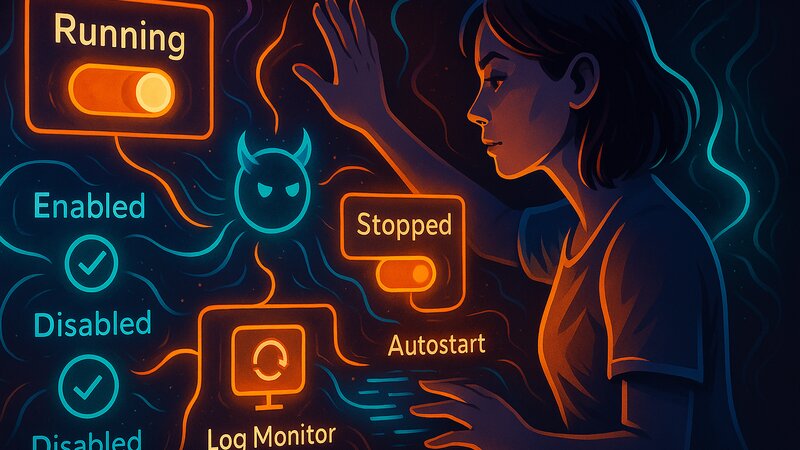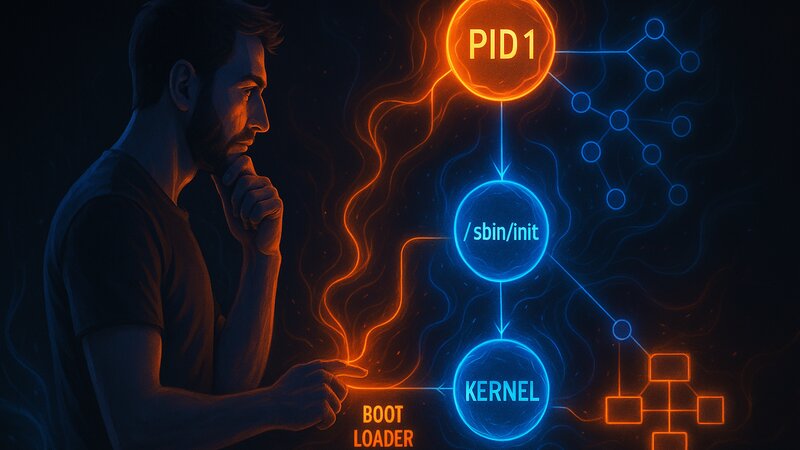
The init process always has process ID 1 (PID 1). After the kernel starts, /sbin/init is executed as the first user-space process. This process runs until the system shuts down and is the ancestor of all other processes.
PID 1: The First Process
The kernel starts after the bootloader and initializes the hardware, memory, and filesystems. As soon as the root filesystem is mounted, the kernel executes /sbin/init. This process automatically receives PID 1—the lowest available process ID.
PID 1 has special properties within the system:
Process Ancestry
Every new process is created as a child of an existing process. PID 1 is the direct or indirect ancestor of every process. If a parent process terminates before its children have exited, PID 1 adopts the orphaned processes (orphan processes).
Signal Handling
Normal processes can be terminated by signals such as SIGTERM or SIGKILL. By default, PID 1 ignores these signals—the system would otherwise stop functioning if the init process were terminated accidentally. Only a clean shutdown or reboot terminates PID 1.
System Shutdown
During shutdown, the kernel sends a special signal to PID 1. The init process stops all running services in a controlled order, unmounts filesystems, and signals the kernel that the system is ready to shut down.
The Boot Sequence: From the Kernel to Services
System startup follows a fixed sequence:
1. Bootloader (GRUB, UEFI)
The bootloader loads the kernel into memory and transfers control to it. Boot parameters such as init=/sbin/init or quiet are passed to the kernel.
2. Kernel Initialization
The kernel detects and initializes the hardware (CPU, RAM, disks, network). It mounts the root filesystem and looks for /sbin/init. Without an init process, the kernel triggers a kernel panic—the system remains unusable.
3. Init Startup (PID 1)
/sbin/init is executed and receives PID 1. The init process reads its configuration—on systemd systems from /etc/systemd/system/, on SysV Init from /etc/inittab, and on OpenBSD from /etc/rc.conf. Based on this configuration, init starts additional processes.
4. Early System Services
Critical system services start first: udev (device management), filesystem checks, and hostname configuration. These services prepare the system for more complex services.
5. Network Services
After network initialization, network-dependent services start: the SSH server, web servers, and databases. The startup order depends on dependencies—a web server requires a functioning network.
6. Login Manager
Finally, the login process is started—getty on server systems for console logins, or a graphical display manager on desktop systems.
On modern hardware, the entire boot process typically takes between 5 and 30 seconds. systemd starts services in parallel, reducing boot time. SysV Init starts services sequentially—slower, but more transparent.
Kernel Space vs. User Space
Unix systems maintain a strict separation between kernel space and user space. This separation protects the system from faulty programs.
Kernel Space
The kernel runs with the highest privileges and has direct access to the hardware. It manages CPU time, memory, filesystems, and networking. Code running in kernel space can crash the entire system—a bug in a network driver can trigger a kernel panic.
User Space
All normal programs run in user space with restricted privileges. They access kernel functionality only through system calls. A crashed user-space program terminates only that process—the rest of the system continues running.
Init as the Bridge
The init process is the first user-space process. It starts with root privileges but runs in user space. Through system calls, init communicates with the kernel—for example when creating new processes (fork(), exec()), changing privileges (setuid()), or sending signals (kill()).
This separation makes Unix systems stable. A faulty service does not crash the entire system because it runs in isolated user space. Only the kernel can directly cause system-wide failures through hardware-level control.
/sbin/init: The Executable Init Program
/sbin/init is the path to the executable init program. What actually resides at this path differs between systems:
systemd
/sbin/init is usually a symbolic link to /lib/systemd/systemd. The systemd binary is complex and provides extensive features: service management, logging (journald), timers (an alternative to cron), and network configuration (networkd).
SysV Init
The classic init implementation is a small C program. It reads /etc/inittab and executes the commands defined there. SysV Init delegates most of its work to shell scripts in /etc/init.d/.
OpenBSD
/sbin/init is part of the base system and is extremely minimalistic. It starts /etc/rc during boot and /etc/rc.shutdown during shutdown. Actual service management is handled by shell scripts.
Alternative Init Systems
Some systems use other init implementations: runit, OpenRC, and s6. During boot, the init= kernel parameter can specify an alternative init process: init=/sbin/runit or init=/bin/bash (for emergency recovery).
Init as the Root of the Process Hierarchy
The process hierarchy of a Unix system is structured as a tree. PID 1 is the root of this tree.
Process Relationships
Every process knows its parent process (Parent Process ID, PPID). The ps -ef command displays this hierarchy:
UID   PID  PPID  CMD
root    1     0  /sbin/init
root  234     1  /usr/sbin/sshd
root  456   234  sshd: user@pts/0
user  789   456  -bash
user  890   789  ps -ef
A PPID of 0 means the process was started by the kernel. PID 1 has PPID 0. Every other process has either PID 1 or one of its descendants as its parent.
Orphan Processes
If a process terminates before its child processes have exited, those child processes become orphan processes. The kernel automatically assigns PID 1 as their new parent. Init assumes responsibility for them and waits for their termination using the wait() system call.
Zombie Processes
A terminated process whose exit status has not yet been collected by its parent process exists as a zombie process. These processes consume no resources other than an entry in the process table. PID 1 cleans up zombie processes whose parent processes no longer exist.
Comparing Init System Philosophies
Init systems differ fundamentally in their philosophy. These differences affect complexity, features, and transparency.
The systemd Approach
Comprehensive system management in a single binary. Parallel service startup accelerates the boot process. Declarative configuration in unit files defines dependencies. Socket activation starts services on demand. Binary logs enable structured queries. This approach integrates many system functions under one framework.
The SysV Init Approach
A minimal init system delegates its work to shell scripts. Sequential startup is slower but predictable. Text-based configuration is transparent and editable. Runlevels define different system states. This approach favors simplicity and the Unix philosophy.
The BSD Approach
Minimal complexity with clearly defined responsibilities. /etc/rc coordinates the boot process. Individual services in /etc/rc.d/ are independent scripts. rcctl provides convenient service management without increasing init complexity. Text-based configuration in /etc/rc.conf centrally controls all services.
The choice of init system affects system administration, boot time, and troubleshooting. systemd provides more features at the cost of greater complexity. SysV Init and BSD init remain transparent and maintainable.
Practical Implications
Understanding PID 1 and init concepts helps with everyday tasks:
Troubleshooting
When services fail to start, the cause is often related to dependencies or the init configuration. The process hierarchy can be examined with ps -ef (the PPID column). On Linux, pstree provides a clearer tree representation.
System Recovery
For boot problems, init=/bin/bash can be used as a kernel parameter to start a shell as PID 1. The system starts without the normal services, making it useful for emergency repairs.
Performance
Boot time depends heavily on the init system. Parallel startup (systemd) reduces boot time, while sequential startup (SysV Init) increases it. The order in which services start determines when the system becomes usable.
Software and Versions Used
This guide applies to:
- Unix/Linux systems: General init concepts
- Context: Distribution-independent — systemd, SysV Init, BSD init
- Current as of: October 2025